|
BomberUnits
...a Unity learning project
|
|
BomberUnits
...a Unity learning project
|
The PlayerManager controlls the local and remote players. More...
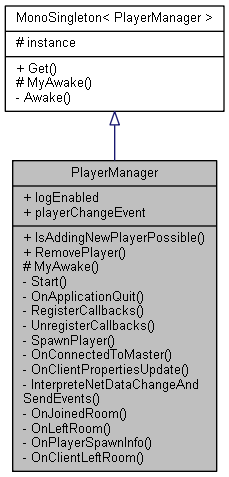
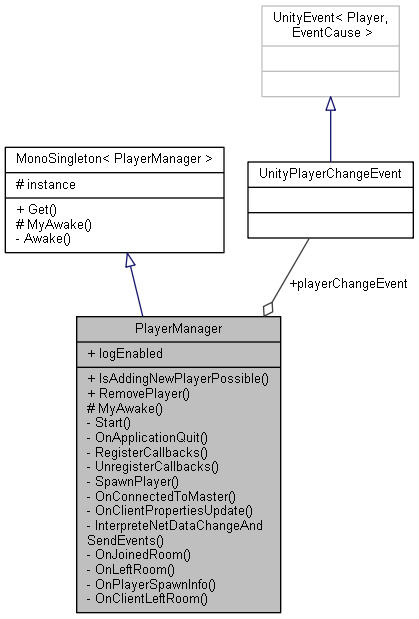
 Inheritance diagram for PlayerManager: Collaboration diagram for PlayerManager:
Public Member Functions | |
| bool | IsAddingNewPlayerPossible () |
Static Public Member Functions | |
| static void | RemovePlayer (Player p) |
| Player removal caused by: More... | |
| Static Public Member Functions inherited from MonoSingleton< PlayerManager > | |
| static T | Get () |
| Singleton access. | |
Public Attributes | |
| bool | logEnabled |
Static Public Attributes | |
| static UnityPlayerChangeEvent | playerChangeEvent |
| Invoked from NET layer but located better here. More... | |
Protected Member Functions | |
| override void | MyAwake () |
| You may override this to have an Awake()-like function. More... | |
Private Member Functions | |
| void | Start () |
| void | OnApplicationQuit () |
| Called also when ending play mode in Unity Editor. | |
| void | RegisterCallbacks () |
| void | UnregisterCallbacks () |
| void | SpawnPlayer (LocalPlayer p) |
| void | OnConnectedToMaster () |
| Callback for updating the local players' client ID after connection. | |
| void | OnClientPropertiesUpdate (string clientId, ExitGames.Client.Photon.Hashtable changedProps) |
| Callback for the clientPropertiesUpdateEvent The NetData needs to be identified and converted first. More... | |
| void | InterpreteNetDataChangeAndSendEvents (string clientId, int uid, NetData netData) |
| Invoking the event is always the last step to be consistent between direct callbacks during OfflineMode and delayed transmission when online. More... | |
| void | OnJoinedRoom () |
| When entering another client's room, this client needs to: More... | |
| void | OnLeftRoom () |
| Leaving a room, we can remove all remote players and clients. More... | |
| void | OnPlayerSpawnInfo (PlayerSpawnNetData data) |
| This is the spawn order with location issued by the master when the match begins. More... | |
| void | OnClientLeftRoom (string clientId) |
| When a client leaves, we can remove all his remote players. More... | |
Additional Inherited Members | |
| Static Protected Attributes inherited from MonoSingleton< PlayerManager > | |
| static T | instance |
| Singleton pattern instance. | |
The PlayerManager controlls the local and remote players.
It is a Singleton and persistent over scenes, like the GameManager. This manager also provides Input Schemes for the local players.
Definition at line 29 of file PlayerManager.cs.
|
inlineprivate |
Invoking the event is always the last step to be consistent between direct callbacks during OfflineMode and delayed transmission when online.
A change can mean an addition, a removal or a change in content. Local Players are not added/removed via their net Data normally -> issue warnings. Also a data change will have occurred due to previous local customization. Remote players in turn are signaled to have been added or removed via their net data.
Definition at line 181 of file PlayerManager.cs.
|
inlineprotectedvirtual |
You may override this to have an Awake()-like function.
Only called if this is the first instance as all further instances are destroyed.
Reimplemented from MonoSingleton< PlayerManager >.
Definition at line 78 of file PlayerManager.cs.
|
inlineprivate |
When a client leaves, we can remove all his remote players.
Interestingly, the netData is still available for these for a while and a second event may arrive after a while! -> catch this gracefully. Maybe this functionality shall make a reconnect possible...
Definition at line 272 of file PlayerManager.cs.
|
inlineprivate |
Callback for the clientPropertiesUpdateEvent The NetData needs to be identified and converted first.
Then it is interpreted.
Definition at line 161 of file PlayerManager.cs.
|
inlineprivate |
When entering another client's room, this client needs to:
Definition at line 221 of file PlayerManager.cs.
|
inlineprivate |
Leaving a room, we can remove all remote players and clients.
We do not have access to their netData any longer -> Remove remaining local representations.
Definition at line 248 of file PlayerManager.cs.
|
inlineprivate |
This is the spawn order with location issued by the master when the match begins.
Each client spawns their own players.
Definition at line 259 of file PlayerManager.cs.
|
inlinestatic |
Player removal caused by:
Definition at line 60 of file PlayerManager.cs.
|
inlineprivate |
Hand networked information to the created object, which allows connecting it to a Player instance:
Definition at line 136 of file PlayerManager.cs.
|
static |
Invoked from NET layer but located better here.
This is activated when player data changes for any client, also for the local client. THIS does however not work when disconnected! -> Do no player modifications then!
The EventCause further specifies what exactly has happended to the player. Addition: Has to be added to the local Model and Views. No guarantee to have net Data yet! Deletion: Has to be removed from local Model and Views A Data Change can affect anything stored in player.NetData:
Definition at line 52 of file PlayerManager.cs.
 1.8.13