|
BomberUnits
...a Unity learning project
|
|
BomberUnits
...a Unity learning project
|
A Menu page groups a number of UI elements (with arbitrary children) which are shown together as a page. More...
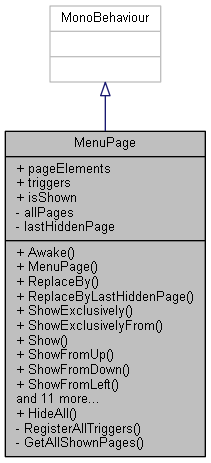
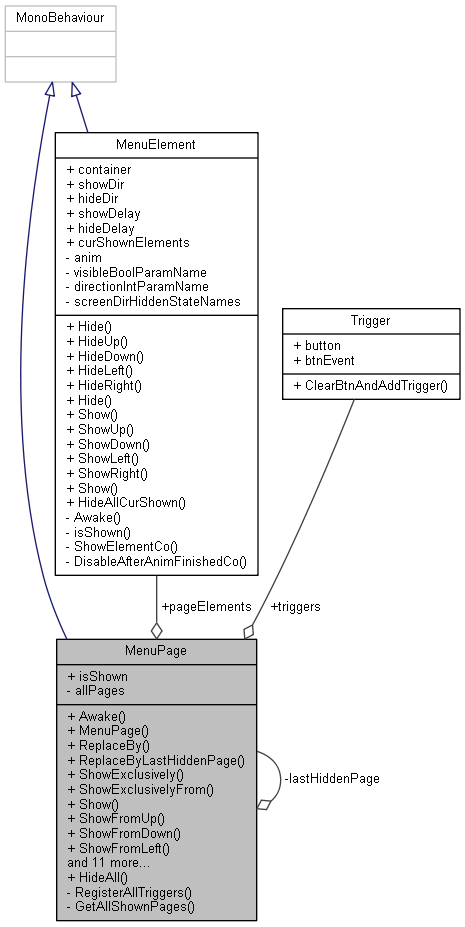
 Inheritance diagram for MenuPage: Collaboration diagram for MenuPage:
Public Member Functions | |
| void | Awake () |
| MenuPage (MenuElement[] pageElements) | |
| Constructor from an array of elements. | |
| void | ReplaceBy (MenuPage other) |
| Hides everything not also on the new page and shows that page instead, elements on both pages are not animated. More... | |
| void | ReplaceByLastHiddenPage () |
| Allows to replace this page by the last hidden page, if any. More... | |
| void | ShowExclusively () |
| Closes everything else before showing this page, elements already shown are not animated. More... | |
| void | ShowExclusivelyFrom (ScreenDir dir) |
| Override to show an exclusive page with all elements coming from a specified direction. More... | |
| void | Show () |
| Shows all contained MenuElements using their specific directions and delay. | |
| void | ShowFromUp () |
| Convenience function to be useable as Callback from the Unity editor. | |
| void | ShowFromDown () |
| Convenience function to be useable as Callback from the Unity editor. | |
| void | ShowFromLeft () |
| Convenience function to be useable as Callback from the Unity editor. | |
| void | ShowFromRight () |
| Convenience function to be useable as Callback from the Unity editor. | |
| void | ShowFrom (ScreenDir dir) |
| Show all elements from a specified direction using their delays, overwriting their directions. More... | |
| void | HideToUp () |
| Convenience function to be useable as Callback from the Unity editor. | |
| void | HideToDown () |
| Convenience function to be useable as Callback from the Unity editor. | |
| void | HideToLeft () |
| Convenience function to be useable as Callback from the Unity editor. | |
| void | HideToRight () |
| Convenience function to be useable as Callback from the Unity editor. | |
| void | Hide () |
| Hide all contained MenuElements using their specific directions and delay. | |
| void | HideTo (ScreenDir dir) |
| Hide all elements to a specified direction using their delays, overwriting their directions. More... | |
| MenuElement [] | ElemNotAlsoInOther (MenuPage other) |
| List< MenuElement > | GetElementsAsList () |
| bool | Contains (MenuElement elem) |
Static Public Member Functions | |
| static void | HideAll () |
Public Attributes | |
| MenuElement [] | pageElements |
| These are the elements that comprise a page. | |
| Trigger [] | triggers |
| bool | isShown = false |
Private Member Functions | |
| void | RegisterAllTriggers () |
Static Private Member Functions | |
| static List< MenuPage > | GetAllShownPages () |
Static Private Attributes | |
| static List< MenuPage > | allPages = new List<MenuPage>() |
| Collects all instances. | |
| static MenuPage | lastHiddenPage = null |
| Can be used to return to a single previous page. | |
A Menu page groups a number of UI elements (with arbitrary children) which are shown together as a page.
It is intended to be assembled in the editor and assigned to a symbolic gameObject for each page.
Definition at line 9 of file MenuPage.cs.
|
inline |
Hide all elements to a specified direction using their delays, overwriting their directions.
This can only be called from script due to the parameter.
Definition at line 220 of file MenuPage.cs.
|
inline |
Hides everything not also on the new page and shows that page instead, elements on both pages are not animated.
Definition at line 67 of file MenuPage.cs.
|
inline |
Allows to replace this page by the last hidden page, if any.
Will log a warning if there is no last hidden page.
Definition at line 87 of file MenuPage.cs.
|
inline |
Closes everything else before showing this page, elements already shown are not animated.
Idea: return a backup:
Definition at line 105 of file MenuPage.cs.
|
inline |
Override to show an exclusive page with all elements coming from a specified direction.
This is typically used to introduce a completely new menu, such as the main menu.
Definition at line 126 of file MenuPage.cs.
|
inline |
Show all elements from a specified direction using their delays, overwriting their directions.
This can only be called from script due to the parameter.
Definition at line 174 of file MenuPage.cs.
 1.8.13