 |
BomberUnits
...a Unity learning project
|
|
BomberUnits
...a Unity learning project
|
The docu consists of auto-generated content from the parsed scripts and additional pages on various topics. To support the duty is good practice as a developer, so:
If you updated the master branch with new documentation, think about pushing the generated html files to the root of the repo hosting the docu here.
Note: We are currently using Doxygen Version 1.8.13 for Windows. Other versions may have queer effects as each version tends to have their own quirks...
Regarding the project (game feature) content itself, there are distinct steps from an idea, to its evaluation/integration on system level, to its realization on SW level. This is explained on the SW Component Design pages.
The resulting SW has to be documented as well, which is done in the SW Architecture and the generated SW detailed design (API). Additionally, there should be pages on development topics, such as tooling and How-Tos.
You can change the Markdown content with any text editor. Some editors, like VS Code, are able to show rendered previews of the Markdown, which gives a hint for how it's going to look as Doxygen output as well.
When adding or modifying content of pages, consider to build the docu afterwards locally, to check whether the result matches your expectations. Also consider uploading the HTML output (in Doc/doxy_out) to our Docu repository: https://github.com/TheRoot89/BomberUnitsDocu
You do not have to create a branch or anything, simply commit your new docu generated content to the master.
Ok, so assuming you want to explain a concept, do a How-to or whatever comes to your mind - and you need to add a new page:
Doc/doxy_in/docs_doxygen.Doc/doxy_in/docs_non_doxygen.At the positions of references and \subpage commands Doxygen will place the page title (may contain spaces) you also defined on the first line.
Note: In case you are reading this as a text file: the commands only use a single backslash: "\". The second one is an escape character for writing this without invoking the command.
PlantUML provides a syntax to specify UML graphs inline from Markdown. The result is rendered here in the preview and in Doxygen. Writing PlantUML with the following Syntax will generate it in the VSCode preview, but also show the initial, quite ugly code block ticks in Doxygen. This is unfortunate but I found no workaround yet. Also the set style configuration file is not included when previewing.
An example for a PlantUML activity diagram:
~~~plantuml
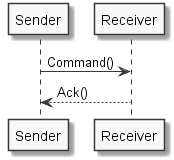
~~~
To import an image file use the command . Again, without any backslashes, should you be reading this in plain text.
Your have to give the path relative to the Doc folder as this is the execution directory for Doxygen. Also, you have to place your images in the doxy_in/images folder, so your path will be: /doxy_in/images/[image_file]
Please note images will usually not be found and displayed in the markdown preview.
 1.8.13